Skill Based The Ultimate
Mathematical Gaming App
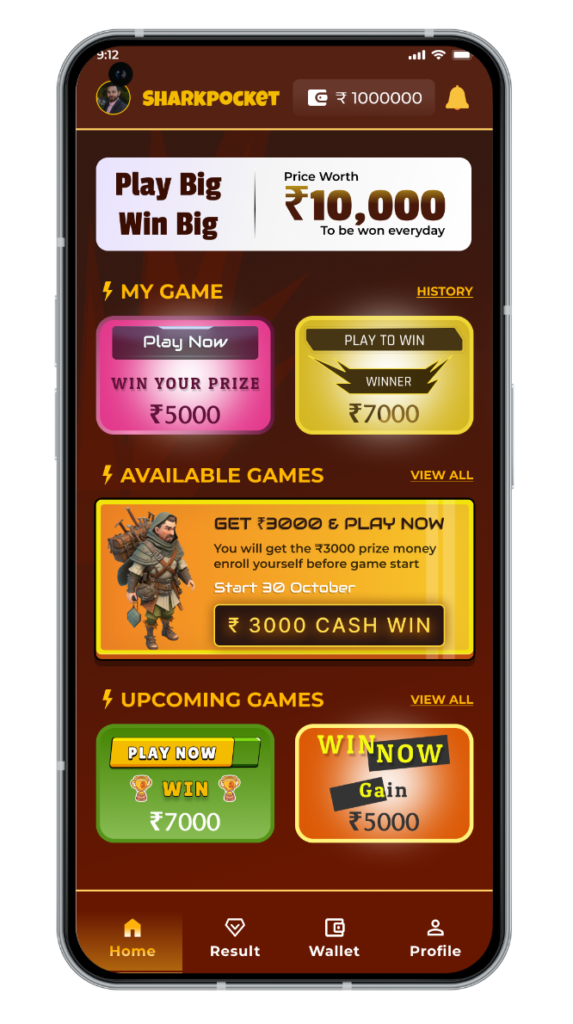
Welcome to Sharkpocket – Where Math Meets Fun and Challenge. Sharkpocket is not just a gaming app; it’s an exciting platform where your mathematical skills come to life! Sharkpocket offers a variety of fun and engaging Mathematical Games that make learning and improving math skills enjoyable.
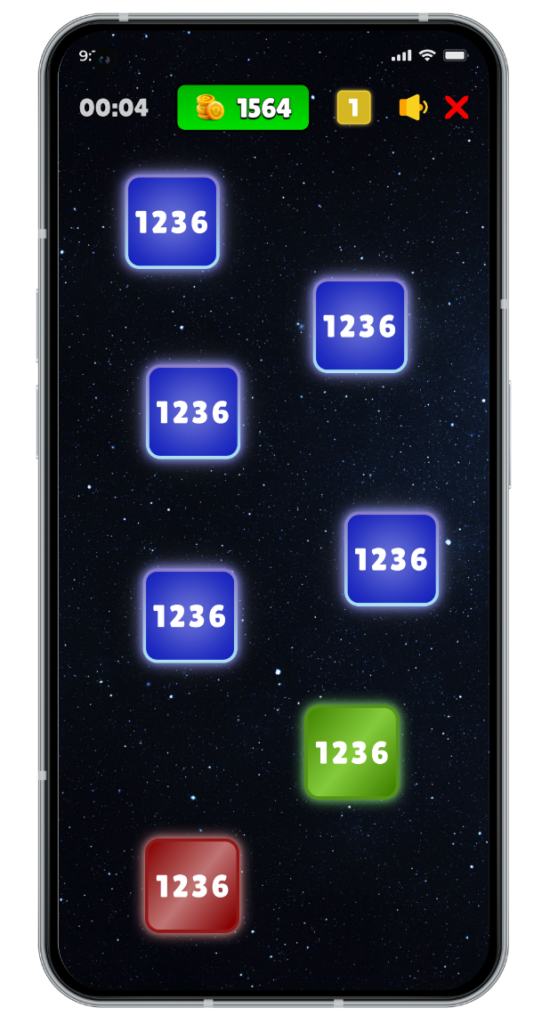
A Simple Game of Maths where Player needs to choose Odd Numbers, Primary Numbers and Elevate your Score basis on your Skill.And Yes..!! An Exciting Winning Prize for Top Scorer..!!!
Play, compete, and unlock rewards with every skill you master!

Real-Time Competitions
Various Gaming Events to Earn Exciting Prizes
Skill-Based Rewards
Unclock your Mathematical Skill
100% Secure Payment
We ensure your money is save
Customer Support 24/7
Instant access to Support
Our Upcoming Games

Hello Gold
Starting form 25 April
- Ticket Price: ₹ 51
- Winning Price: 50 Grams Gold
Take your shot at winning real gold while enjoying an exciting gaming experience. Don’t miss out on the golden opportunity to play and win!
About Sharkpocket
Mobile Gaming Application “Sharkpocket” owned and operated by “Sharkpocket Solutions LLP” constituted under the Companies Act, 2013 with LLPIN: AAY-2156 where Sharkpocket is engaged in the business of skill-based Mobile Games. Access the Game and avail the services of platform wherein players are offered promotional games, practice games, cash games and other non-cash Prize games on the applications.
The nature of the game is Mathematical which is a skill based game, the players are required to pay attention to every detail. Consisting hardworking on those details to gain a win is required. Any Indian Resident above the age of 18 years is eligible to register at platform except from certain restricted States. Registered users should submit an active Mobile Number and other necessary documents to comply with the KYC process.

How Sharkpocket Works
-
Download Sharkpocket: Available on Android. Download it from the Downloads button and sign up to start your mathematical journey.
-
Select a Game: Choose from a variety of math-based games that challenge different skills: mental math, algebra and more.
-
Start Competing: Play in real-time against other math enthusiasts or take on the clock in solo challenges. The more you play, the better your skills become!
-
Earn Points & Rewards: The faster and more accurately you solve problems, the more points you earn. Unlock exciting rewards as you progress.
-
Track Your Growth: Monitor your stats and improvement, and compete in tournaments to test your skills against top players worldwide

Features
Real-Time Competitions
Various Gaming Events to Earn Exciting Prizes
100% Secure Payment
We ensure your money is save
Instant Withdraw Winning
Withdraw your Winning Amount Instantly through our Various Banking Partners
Safe and Secure KYC Process
Follow your KYC through our Safe and Trusted Partner Cashfree.
Skill-Based Rewards
Unclock your Mathematical Skill
Customer Support 24/7
Instant access to Support
Trusted payment partners
Trusted payment partners like PayTM, Google Pay, PhonePe, and BHIM are available for secure transactions
Exciting Winning Prizes
Play, compete, and unlock various Exciting Winning Prizes and Real Cash Money.
Our Partners
Payment Gateway

KYC Verification

Payout Service

Telecom Regulatory

SMS Gateway

Get the App and Win Crores
Why Choose Sharkpocket for Math Gaming?
-
Skill Development: Sharkpocket boosts math skills by enhancing mental arithmetic, problem-solving, and logical thinking in a fun, competitive environment.
-
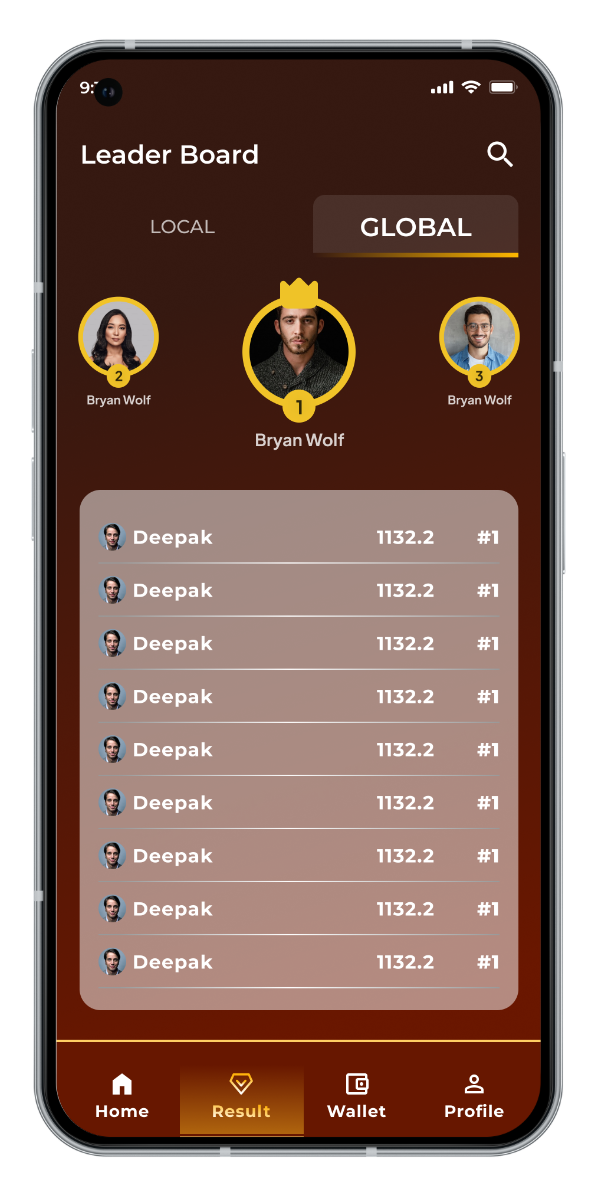
Global Competition: Challenge players from around the world, compete in global math tournaments, and see how you stack up on the leaderboards.
-
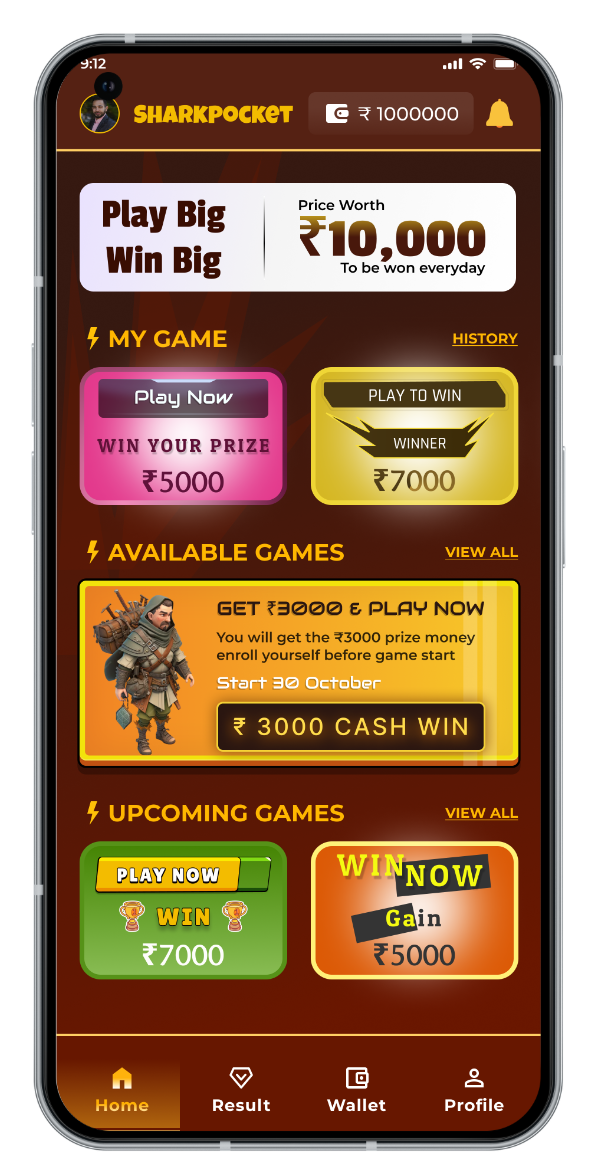
Real Rewards for Real Skills: Whether you’re playing for fun or to improve, Sharkpocket rewards your math skills with real prizes like cash, gift cards, and other exciting rewards.
-
Fun & Engaging Learning: Sharkpocket makes learning fun with math games, puzzles, daily challenges, and quizzes for an interactive experience.
-
Safe & Secure: Your privacy and data security are our priority. Sharkpocket ensures that you have a safe, secure environment to play, learn, and grow your math skills

Frequently Ask Questions
You can verify your Aadhaar card, Voter ID, or Driving License as per the Google PlayStore policy, to ensure compliance with State Gaming laws.
Depending on the document you choose, please follow the simple steps below to successfully verify your account and start playing on Sharkpocket
To verify your Aadhaar, you have the following options:
If your Aadhaar has a mobile number linked to it, use the 'Verify Aadhaar via OTP.'
If your Aadhaar does not have a mobile number linked to it, verify using either the option of 'Enter Aadhaar number' or 'Upload Aadhaar'
To verify your Driving License or Voter ID, upload a soft copy of the document using the 'Upload' option
Yes! Users need to verify their PAN and bank details for the following reasons -
Withdrawals involve transferring your winning amount to your bank account
To issue TDS certificates on time whenever applicable
Don't worry!
If you do not have an Aadhaar, you can also verify your Voter ID or Driving License.
In case you need any further help, contact us here.
Withdrawals on Sharkpocket involve a transfer of money; hence, verifying your PAN card and bank account is mandatory.
To verify your PAN card, you need to:
Provide your PAN number along with the full name and date of birth as per the PAN
It is important that the full name on the PAN card to be verified must match:
Full name on any previously verified KYC document
Full name on bank account which you want to verify
The PAN verification is completed in a maximum of 1 working day.
Open My Profile > Tap on Verify PAN
First, you'll need to unlink your bank account and place a verification request for a new one.
You can change your bank account up to 10 times directly via the app.
Here's how to unlink your bank account.
Go to My Profile
Go to Bank Account (Verified)
Scroll down and click on Unlink
Now, link your new bank account from the same KYC tab. For this:
Tap Bank Account and type your bank account details
Here are some important points to keep in mind while changing your bank account:
Once verified, the same bank account can't be verified on any other Sharkpocket account
You can verify a bank account in your name only where the bank account name matches the name on the verified PAN
NRE accounts and Wallets can't be verified, while payment banks do work if you are an Android user.
Frequently Ask Questions
You can verify your Aadhaar card, Voter ID, or Driving License as per the Google PlayStore policy, to ensure compliance with State Gaming laws.
Depending on the document you choose, please follow the simple steps below to successfully verify your account and start playing on Sharkpocket
To verify your Aadhaar, you have the following options:
If your Aadhaar has a mobile number linked to it, use the 'Verify Aadhaar via OTP.'
If your Aadhaar does not have a mobile number linked to it, verify using either the option of 'Enter Aadhaar number' or 'Upload Aadhaar'
To verify your Driving License or Voter ID, upload a soft copy of the document using the 'Upload' option
Yes! Users need to verify their PAN and bank details for the following reasons -
Withdrawals involve transferring your winning amount to your bank account
To issue TDS certificates on time whenever applicable
Don't worry!
If you do not have an Aadhaar, you can also verify your Voter ID or Driving License.
In case you need any further help, contact us here.
Withdrawals on Sharkpocket involve a transfer of money; hence, verifying your PAN card and bank account is mandatory.
To verify your PAN card, you need to:
Provide your PAN number along with the full name and date of birth as per the PAN
It is important that the full name on the PAN card to be verified must match:
Full name on any previously verified KYC document
Full name on bank account which you want to verify
The PAN verification is completed in a maximum of 1 working day.
Open My Profile > Tap on Verify PAN
First, you'll need to unlink your bank account and place a verification request for a new one.
You can change your bank account up to 10 times directly via the app.
Here's how to unlink your bank account.
Go to My Profile
Go to Bank Account (Verified)
Scroll down and click on Unlink
Now, link your new bank account from the same KYC tab. For this:
Tap Bank Account and type your bank account details
Here are some important points to keep in mind while changing your bank account:
Once verified, the same bank account can't be verified on any other Sharkpocket account
You can verify a bank account in your name only where the bank account name matches the name on the verified PAN
NRE accounts and Wallets can't be verified, while payment banks do work if you are an Android user.
You can verify your Aadhaar card, Voter ID, or Driving License as per the Google PlayStore policy, to ensure compliance with State Gaming laws.
Depending on the document you choose, please follow the simple steps below to successfully verify your account and start playing on Sharkpocket
To verify your Aadhaar, you have the following options:
If your Aadhaar has a mobile number linked to it, use the 'Verify Aadhaar via OTP.'
If your Aadhaar does not have a mobile number linked to it, verify using either the option of 'Enter Aadhaar number' or 'Upload Aadhaar'
To verify your Driving License or Voter ID, upload a soft copy of the document using the 'Upload' option
Yes! Users need to verify their PAN and bank details for the following reasons -
Withdrawals involve transferring your winning amount to your bank account
To issue TDS certificates on time whenever applicable
Don't worry!
If you do not have an Aadhaar, you can also verify your Voter ID or Driving License.
In case you need any further help, contact us here.
Withdrawals on Sharkpocket involve a transfer of money; hence, verifying your PAN card and bank account is mandatory.
To verify your PAN card, you need to:
Provide your PAN number along with the full name and date of birth as per the PAN
It is important that the full name on the PAN card to be verified must match:
Full name on any previously verified KYC document
Full name on bank account which you want to verify
The PAN verification is completed in a maximum of 1 working day.
Open My Profile > Tap on Verify PAN
First, you'll need to unlink your bank account and place a verification request for a new one.
You can change your bank account up to 10 times directly via the app.
Here's how to unlink your bank account.
Go to My Profile
Go to Bank Account (Verified)
Scroll down and click on Unlink
Now, link your new bank account from the same KYC tab. For this:
Tap Bank Account and type your bank account details
Here are some important points to keep in mind while changing your bank account:
Once verified, the same bank account can't be verified on any other Sharkpocket account
You can verify a bank account in your name only where the bank account name matches the name on the verified PAN
NRE accounts and Wallets can't be verified, while payment banks do work if you are an Android user.
You can verify your Aadhaar card, Voter ID, or Driving License as per the Google PlayStore policy, to ensure compliance with State Gaming laws.
Depending on the document you choose, please follow the simple steps below to successfully verify your account and start playing on Sharkpocket
To verify your Aadhaar, you have the following options:
If your Aadhaar has a mobile number linked to it, use the 'Verify Aadhaar via OTP.'
If your Aadhaar does not have a mobile number linked to it, verify using either the option of 'Enter Aadhaar number' or 'Upload Aadhaar'
To verify your Driving License or Voter ID, upload a soft copy of the document using the 'Upload' option
Yes! Users need to verify their PAN and bank details for the following reasons -
Withdrawals involve transferring your winning amount to your bank account
To issue TDS certificates on time whenever applicable
Don't worry!
If you do not have an Aadhaar, you can also verify your Voter ID or Driving License.
In case you need any further help, contact us here.
Withdrawals on Sharkpocket involve a transfer of money; hence, verifying your PAN card and bank account is mandatory.
To verify your PAN card, you need to:
Provide your PAN number along with the full name and date of birth as per the PAN
It is important that the full name on the PAN card to be verified must match:
Full name on any previously verified KYC document
Full name on bank account which you want to verify
The PAN verification is completed in a maximum of 1 working day.
Open My Profile > Tap on Verify PAN
First, you'll need to unlink your bank account and place a verification request for a new one.
You can change your bank account up to 10 times directly via the app.
Here's how to unlink your bank account.
Go to My Profile
Go to Bank Account (Verified)
Scroll down and click on Unlink
Now, link your new bank account from the same KYC tab. For this:
Tap Bank Account and type your bank account details
Here are some important points to keep in mind while changing your bank account:
Once verified, the same bank account can't be verified on any other Sharkpocket account
You can verify a bank account in your name only where the bank account name matches the name on the verified PAN
NRE accounts and Wallets can't be verified, while payment banks do work if you are an Android user.
You can verify your Aadhaar card, Voter ID, or Driving License as per the Google PlayStore policy, to ensure compliance with State Gaming laws.
Depending on the document you choose, please follow the simple steps below to successfully verify your account and start playing on Sharkpocket
To verify your Aadhaar, you have the following options:
If your Aadhaar has a mobile number linked to it, use the 'Verify Aadhaar via OTP.'
If your Aadhaar does not have a mobile number linked to it, verify using either the option of 'Enter Aadhaar number' or 'Upload Aadhaar'
To verify your Driving License or Voter ID, upload a soft copy of the document using the 'Upload' option
Yes! Users need to verify their PAN and bank details for the following reasons -
Withdrawals involve transferring your winning amount to your bank account
To issue TDS certificates on time whenever applicable
Don't worry!
If you do not have an Aadhaar, you can also verify your Voter ID or Driving License.
In case you need any further help, contact us here.
Withdrawals on Sharkpocket involve a transfer of money; hence, verifying your PAN card and bank account is mandatory.
To verify your PAN card, you need to:
Provide your PAN number along with the full name and date of birth as per the PAN
It is important that the full name on the PAN card to be verified must match:
Full name on any previously verified KYC document
Full name on bank account which you want to verify
The PAN verification is completed in a maximum of 1 working day.
Open My Profile > Tap on Verify PAN
First, you'll need to unlink your bank account and place a verification request for a new one.
You can change your bank account up to 10 times directly via the app.
Here's how to unlink your bank account.
Go to My Profile
Go to Bank Account (Verified)
Scroll down and click on Unlink
Now, link your new bank account from the same KYC tab. For this:
Tap Bank Account and type your bank account details
Here are some important points to keep in mind while changing your bank account:
Once verified, the same bank account can't be verified on any other Sharkpocket account
You can verify a bank account in your name only where the bank account name matches the name on the verified PAN
NRE accounts and Wallets can't be verified, while payment banks do work if you are an Android user.
You can verify your Aadhaar card, Voter ID, or Driving License as per the Google PlayStore policy, to ensure compliance with State Gaming laws.
Depending on the document you choose, please follow the simple steps below to successfully verify your account and start playing on Sharkpocket
To verify your Aadhaar, you have the following options:
If your Aadhaar has a mobile number linked to it, use the 'Verify Aadhaar via OTP.'
If your Aadhaar does not have a mobile number linked to it, verify using either the option of 'Enter Aadhaar number' or 'Upload Aadhaar'
To verify your Driving License or Voter ID, upload a soft copy of the document using the 'Upload' option
Yes! Users need to verify their PAN and bank details for the following reasons -
Withdrawals involve transferring your winning amount to your bank account
To issue TDS certificates on time whenever applicable
Don't worry!
If you do not have an Aadhaar, you can also verify your Voter ID or Driving License.
In case you need any further help, contact us here.
Withdrawals on Sharkpocket involve a transfer of money; hence, verifying your PAN card and bank account is mandatory.
To verify your PAN card, you need to:
Provide your PAN number along with the full name and date of birth as per the PAN
It is important that the full name on the PAN card to be verified must match:
Full name on any previously verified KYC document
Full name on bank account which you want to verify
The PAN verification is completed in a maximum of 1 working day.
Open My Profile > Tap on Verify PAN
First, you'll need to unlink your bank account and place a verification request for a new one.
You can change your bank account up to 10 times directly via the app.
Here's how to unlink your bank account.
Go to My Profile
Go to Bank Account (Verified)
Scroll down and click on Unlink
Now, link your new bank account from the same KYC tab. For this:
Tap Bank Account and type your bank account details
Here are some important points to keep in mind while changing your bank account:
Once verified, the same bank account can't be verified on any other Sharkpocket account
You can verify a bank account in your name only where the bank account name matches the name on the verified PAN
NRE accounts and Wallets can't be verified, while payment banks do work if you are an Android user.
You can verify your Aadhaar card, Voter ID, or Driving License as per the Google PlayStore policy, to ensure compliance with State Gaming laws.
Depending on the document you choose, please follow the simple steps below to successfully verify your account and start playing on Sharkpocket
To verify your Aadhaar, you have the following options:
If your Aadhaar has a mobile number linked to it, use the 'Verify Aadhaar via OTP.'
If your Aadhaar does not have a mobile number linked to it, verify using either the option of 'Enter Aadhaar number' or 'Upload Aadhaar'
To verify your Driving License or Voter ID, upload a soft copy of the document using the 'Upload' option
Yes! Users need to verify their PAN and bank details for the following reasons -
Withdrawals involve transferring your winning amount to your bank account
To issue TDS certificates on time whenever applicable
Don't worry!
If you do not have an Aadhaar, you can also verify your Voter ID or Driving License.
In case you need any further help, contact us here.
Withdrawals on Sharkpocket involve a transfer of money; hence, verifying your PAN card and bank account is mandatory.
To verify your PAN card, you need to:
Provide your PAN number along with the full name and date of birth as per the PAN
It is important that the full name on the PAN card to be verified must match:
Full name on any previously verified KYC document
Full name on bank account which you want to verify
The PAN verification is completed in a maximum of 1 working day.
Open My Profile > Tap on Verify PAN
First, you'll need to unlink your bank account and place a verification request for a new one.
You can change your bank account up to 10 times directly via the app.
Here's how to unlink your bank account.
Go to My Profile
Go to Bank Account (Verified)
Scroll down and click on Unlink
Now, link your new bank account from the same KYC tab. For this:
Tap Bank Account and type your bank account details
Here are some important points to keep in mind while changing your bank account:
Once verified, the same bank account can't be verified on any other Sharkpocket account
You can verify a bank account in your name only where the bank account name matches the name on the verified PAN
NRE accounts and Wallets can't be verified, while payment banks do work if you are an Android user.
You can verify your Aadhaar card, Voter ID, or Driving License as per the Google PlayStore policy, to ensure compliance with State Gaming laws.
Depending on the document you choose, please follow the simple steps below to successfully verify your account and start playing on Sharkpocket
To verify your Aadhaar, you have the following options:
If your Aadhaar has a mobile number linked to it, use the 'Verify Aadhaar via OTP.'
If your Aadhaar does not have a mobile number linked to it, verify using either the option of 'Enter Aadhaar number' or 'Upload Aadhaar'
To verify your Driving License or Voter ID, upload a soft copy of the document using the 'Upload' option
Yes! Users need to verify their PAN and bank details for the following reasons -
Withdrawals involve transferring your winning amount to your bank account
To issue TDS certificates on time whenever applicable
Don't worry!
If you do not have an Aadhaar, you can also verify your Voter ID or Driving License.
In case you need any further help, contact us here.
Withdrawals on Sharkpocket involve a transfer of money; hence, verifying your PAN card and bank account is mandatory.
To verify your PAN card, you need to:
Provide your PAN number along with the full name and date of birth as per the PAN
It is important that the full name on the PAN card to be verified must match:
Full name on any previously verified KYC document
Full name on bank account which you want to verify
The PAN verification is completed in a maximum of 1 working day.
Open My Profile > Tap on Verify PAN
First, you'll need to unlink your bank account and place a verification request for a new one.
You can change your bank account up to 10 times directly via the app.
Here's how to unlink your bank account.
Go to My Profile
Go to Bank Account (Verified)
Scroll down and click on Unlink
Now, link your new bank account from the same KYC tab. For this:
Tap Bank Account and type your bank account details
Here are some important points to keep in mind while changing your bank account:
Once verified, the same bank account can't be verified on any other Sharkpocket account
You can verify a bank account in your name only where the bank account name matches the name on the verified PAN
NRE accounts and Wallets can't be verified, while payment banks do work if you are an Android user.
Let's Discuss Your Requirements
To raise your Dispute/Complaints, Concerns, Suggestions or for Gaming related Support, Kindly Write to us on
support@sharkpocket.in
varshad@sharkpocket.in
+91 90048 75858